UNRUIN
this site · the data on this page is invented
free your own hardware no agents

A backup you have
seen restore

Unruin takes the backup, restores it straight back, and tells you when it did not restore. It reaches your machines over SSH; there is nothing to install on them — the backup engine ships itself over as a single file in the user's cache: no packages, no daemon, nothing touched system-wide.

  • The fear is not "there is no backup". The fear is "there was one, and it did not restore" — that is the thing Unruin checks, on every run.
  • Every copy goes to more than one place: a folder, a NAS, S3. One shelf is not a backup.
  • Engine jargon stays in the run log. The interface says jobs, storages, restore points.
  • Nothing leaves your network: no data, no metrics, no addresses. Neither from the product nor from this page.

Below is a real Unruin dashboard running on an invented fleet of seven jobs. Nothing to install: the failure and the restore are both walked through right here, in your browser.

Everything inside that frame is in Russian

The product's interface — the dashboard, the wizard, the restore flow, the error messages — is written in Russian, and there is no English build hiding somewhere. You would have found this out ten minutes after docker compose up, so you are finding it out now instead.

The CLI, the config file and the printed restore runbook are English. If you read YAML and a terminal, you can run Unruin today; the dashboard will be a translation exercise for you.

The tour below works anyway: this column translates every screen as it changes. What is being demonstrated is how the product behaves, and behaviour survives translation better than copy does.

Help with the English interface is welcome, and it is the single most useful thing anyone could contribute right now.

00

What follows is not a pitch. It is a lesson on the product

Five beats. You walk through a failure and get the data back without installing anything. Everything the site says lives out here in the margins — numbers on the left, explanation on the right. Inside the frame, only the product speaks.

The data is invented. The screens, the statuses, the phrasing and the error text are not: they are computed by the same dashboard that ships in the image, from the data we hand it. A stand that showed a restore prettier than it really is would be the most elaborate lie on this site.

Beats advance as you scroll. From the keyboard — [ and ].

unruin dashboard · the real one invented data
01
The fleet is fine

This is what normal looks like.

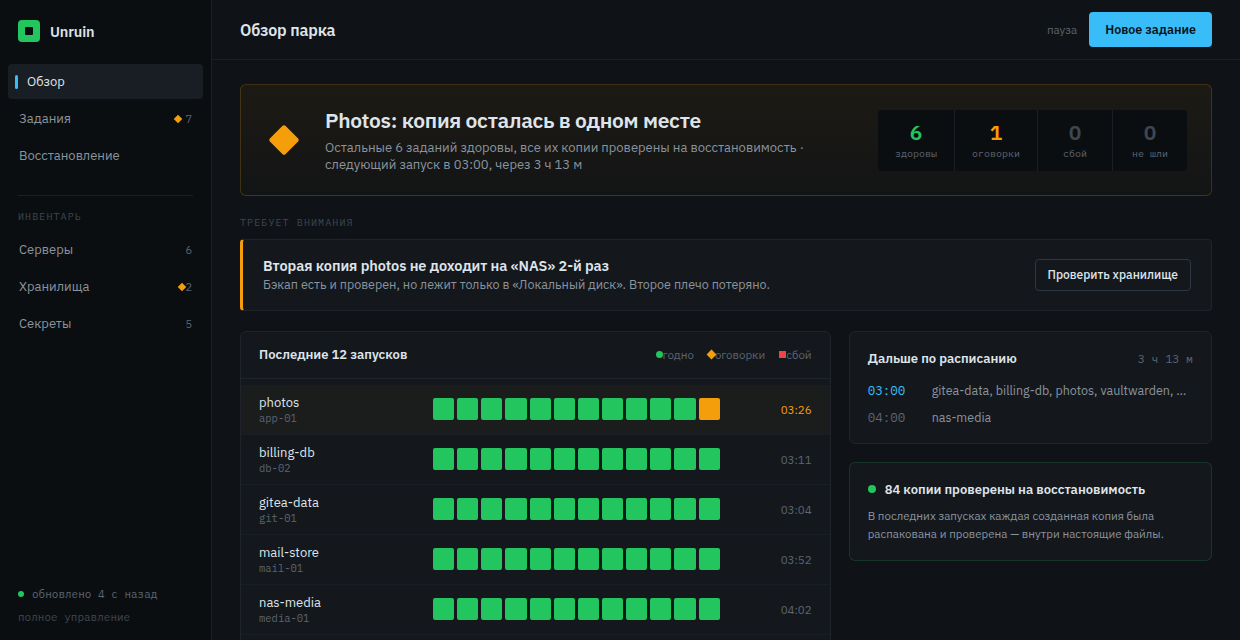
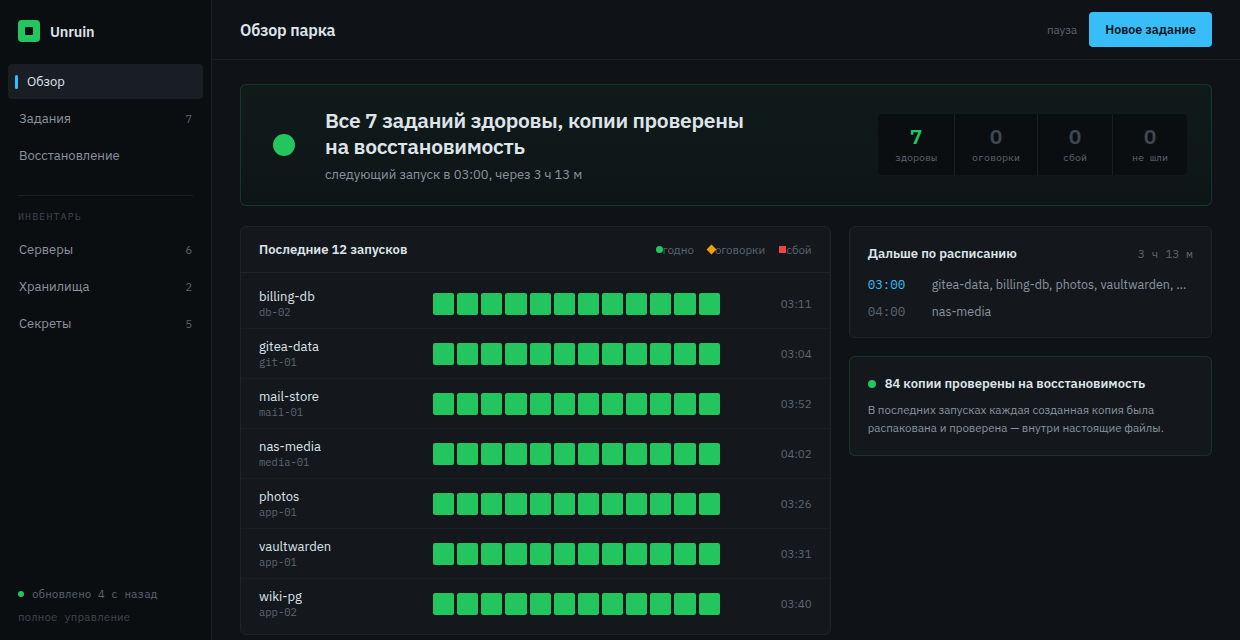
The top line is the only thing that has to be read in five seconds, and it is a sentence, not a row of numbers: «Все 7 заданий здоровы, копии проверены на восстановимость» — all seven jobs healthy, every copy proven by restoring it.

The circle means fine. Shape carries the state alongside colour, so a status survives a printout and a colour-blind reader: diamond is degraded, square is failed, a dashed ring means never run.

Bottom right is the thing the product spends extra minutes on after every backup — «84 копии проверены на восстановимость»: how many copies it unpacked and read back, not how many commands exited zero.

Remember this screen. The next beat does not read without it.
02
Something broke

The product neither goes quiet nor shouts.

The verdict changed to «Photos: копия осталась в одном месте» — the photos copy stayed in one place. A block titled «Требует внимания» (needs attention) appeared, the photos row rose to the top and took a diamond, the degraded counter went to one. Nothing else blinked or moved.

Degraded is a state of its own, not "almost fine". The backup was made and verified — it just sits in a single place. One shelf is not a backup.

The wording names the consequence, not the cause: "the second copy is not arriving", not "SFTP timeout". The cause is one screen further in, and it is in plain language there too.

03
What exactly broke

This is where you decide whether this is serious or a toy.

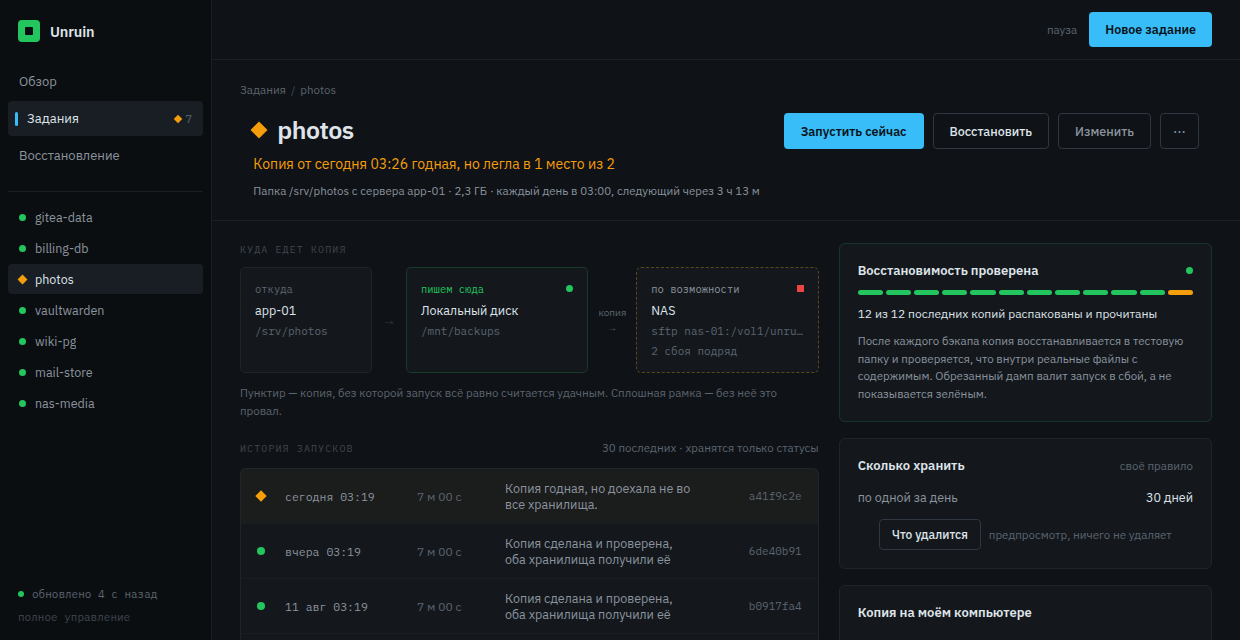
The line under the job name says the copy is good but landed in one place out of two. Below it is the route the copy took: taken from app-01, written to the local disk, not delivered to the NAS, «2 сбоя подряд» — two consecutive failures.

The history text is not the engine's output, it is a translation of it. The engine said copy to "NAS": ssh: connect to host nas-01 port 22: i/o timeout; the dashboard says "the copy is good but did not reach every storage". Consequence first; the mechanics stay in the log for whoever wants them.

A partial failure does not cancel the backup: on the right, «12 из 12» of the recent copies were unpacked and read. The product never shows green over a copy that will not restore — a run whose verify fails goes red.

Next you will press «Восстановить» — restore. Nothing leaves the stand; the restore runs against an invented server.

04
Get the data back

A restore is not a half-day project. It is a button you have already pressed.

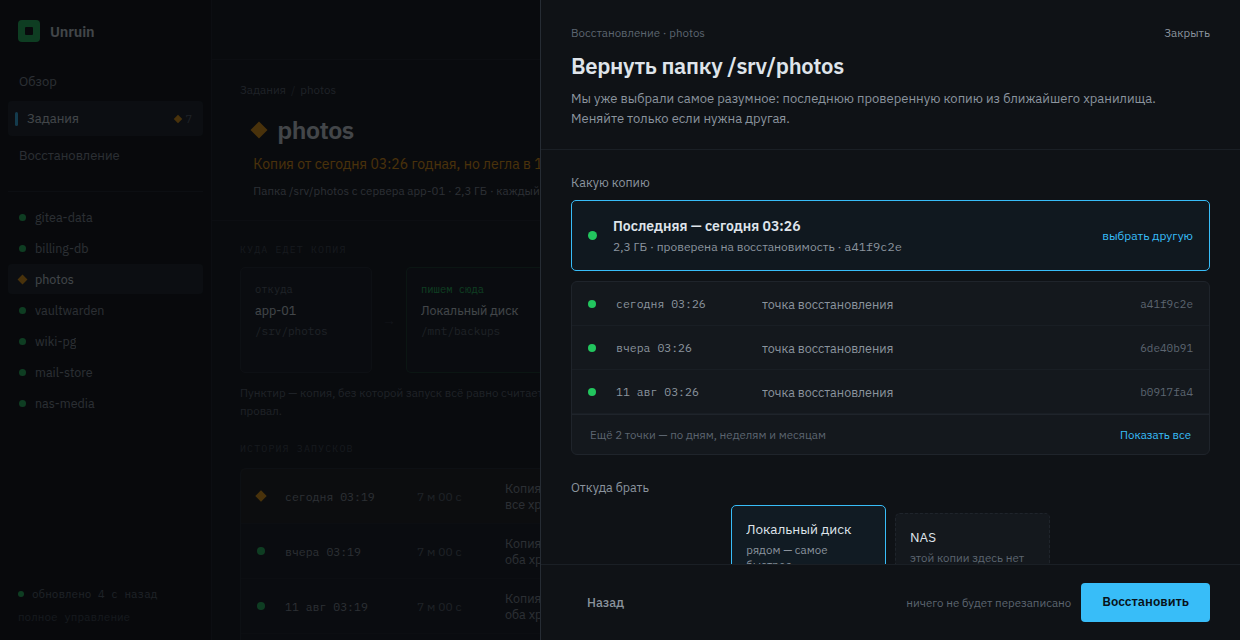
Every answer is pre-filled: which copy, where from, where to. There is almost nothing to choose — in the middle of an incident there is nothing to choose with. The restore point can be changed, but the latest good one is already selected.

Your working directory is not touched: the copy lands beside it, in a new folder. The product never swaps your data in for you; it puts the files down and tells you what to do next.

playback sped up

A real restore takes minutes — as long as unpacking your volume takes. Here it is compressed into a few seconds. This is the only place on the site where we bent time, which is why it says so.

05
And if Unruin itself is gone

The tool does not hold you hostage.

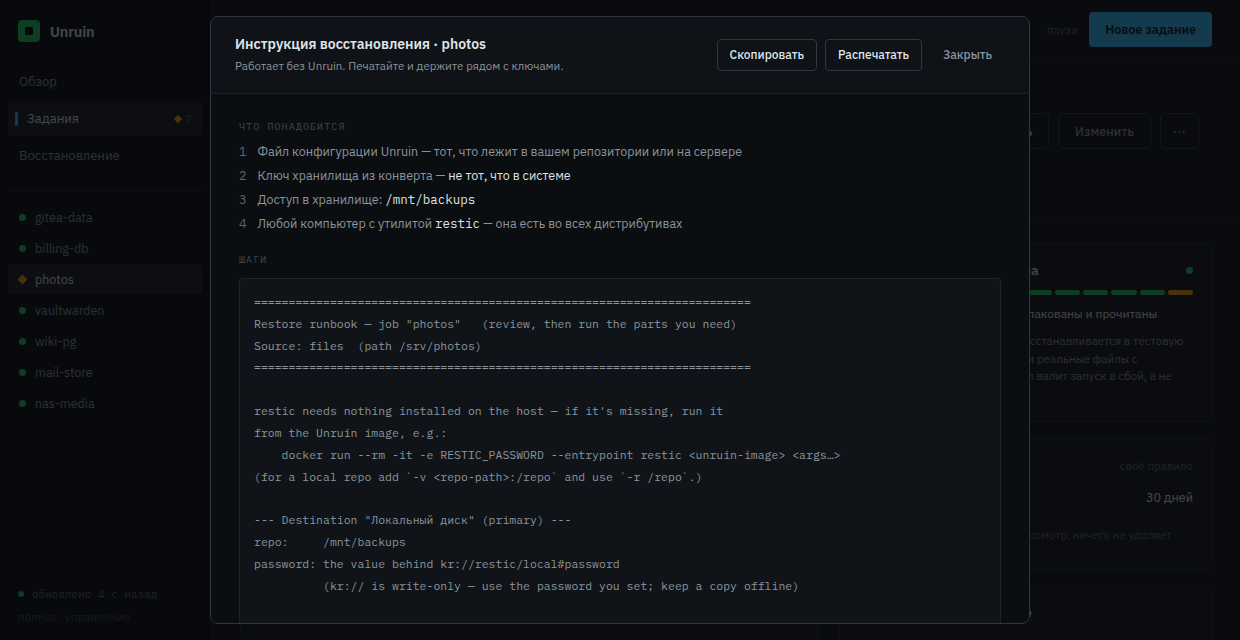
Your copies sit in a format that reads without us. If Unruin disappears along with the control box, the data comes out in four commands on any machine — you need the config, the repository key and access to the storage.

The product prints this sheet itself, with your addresses and job names filled in. The repository key is never printed on it.

This is the one place the word restic is spoken: here you will be calling that program by hand, so you have to know its name. The sheet is in English for the same reason — it is a program's output, not the site's prose.

what Unruin does not guarantee

Now that you have watched a restore with your own hands

The backups are yours

The tool is free and comes with no warranty. It runs on your machines, with your copies, and the responsibility for them stays yours. Nothing goes out: no data, no metrics, no addresses.

The repository key is unrecoverable

Lose the key and those copies never open again: not for you, not for us, not by court order. Keep it in an offline envelope, away from the control box.

Verification is not insurance

Restore-verify catches copies that will not unpack. It does not catch a burnt storage, a wiped key, or a mistake in your own config. Twice a year, restore something by hand from the sheet in beat 5 — that is the check worth believing.

One person writes this

Unruin is written by one person in their spare time. Reports get read, response times are not promised, and tomorrow's release may not happen. The source is available in full — you can see exactly what happens to your data instead of taking our word for it.

This is not fine print and not a licence. It is a way of not having to believe us: the sheet from beat 5 can be checked on your own machine in ten minutes, and after that our promises are unnecessary.

Usually these four paragraphs are buried in a licence file. Before the tour they would have read as cowardice. After you have pulled your data back yourself, they read as engineering honesty.

the first five minutes

One control box, one compose file, one job

It installs on the control box only — 512 MB of memory is enough, the cheapest VPS or a mini-PC in a cupboard will do. On the servers you are backing up, nothing is installed.

have ready
A server address and an SSH key
and
Somewhere to put copies: a folder next door, a NAS, or S3-compatible storage
and invent
Two phrases: a dashboard password, and a master passphrase that encrypts every other key. Put the master passphrase in an offline envelope — without it Unruin decrypts none of its own secrets.
takes
One compose file and one job. The first copy takes as long as your data takes — that part we cannot know for you.
before compose
a config, a folder for copies, and the two phrases
mkdir -p config backups
echo '{}' > config/jobs.yaml

# the two phrases; compose reads this file by itself
cat > .env <<'EOF'
UNRUIN_AUTH_PASSWORD=your-dashboard-password
UNRUIN_MASTER_PASSPHRASE=master-passphrase-for-the-envelope
EOF
chmod 600 .env
compose.yml
services:
  unruin:
    image: git.dreep.ru/smirnar/unruin:1.0.0
    restart: unless-stopped
    command: ["serve", "/config/jobs.yaml"]
    ports:
      - "8080:8080"
    volumes:
      # jobs; the dashboard writes here itself, so not :ro
      - ./config:/config
      # run history, keys, known hosts
      - unruin-state:/var/lib/unruin
      # the first storage — just a folder
      - ./backups:/mnt/backups
      # the key that opens your servers
      - ~/.ssh/id_ed25519:/keys/ssh:ro
    environment:
      UNRUIN_LISTEN: ":8080"
      # dashboard login
      UNRUIN_AUTH_USER: "you"
      UNRUIN_AUTH_PASSWORD: "${UNRUIN_AUTH_PASSWORD}"
      # encrypts every other key — envelope, offline
      UNRUIN_MASTER_PASSPHRASE: "${UNRUIN_MASTER_PASSPHRASE}"

volumes:
  unruin-state:
run it
docker compose up -d
# then — http://localhost:8080

The whole file, not "one magic command": you have a right to know what you are running on your own machine before you run it. Without a password the dashboard simply refuses to come up on a public address.

What you see when it works

An empty dashboard and an invitation to add the first server. You paste an address, Unruin checks the access itself and shows what is on the machine; you pick a folder or a database and set a schedule. A few minutes later the history holds its first run, marked as verified by restoring it — exactly the screen this tour opened with.

If it did not work: the dashboard never came up — read docker compose logs unruin; the product refuses to start quietly and says what it was missing. It cannot reach a server — it will name the step that failed and what to check.

Everything Unruin does is described by a text file, config/jobs.yaml, which you can keep in git. You can also set all of it up by clicking: the file appears on its own.

Past this paragraph, the documentation takes over: every configuration field, preparing a server, what exactly counts as a successful run, and how to restore when Unruin itself is what you have lost. It is in Russian, like the product's interface — said here rather than discovered one click later. Help with an English translation is welcome.